
How TGA Uses Kaliun for Remodeling Selections and Job Progress

Ownership disclosure: TGA Kitchens & Remodeling and Kaliun share an owner, Tomer Amar. Kaliun publishes this first-party case study about TGA's use of the product. It is not an independent review or a ranking of remodeling companies.
The cover is an AI-generated editorial illustration. The two interface screenshots within this article are captures from TGA’s actual Kaliun workspace.
A remodel has several decisions moving at once: which floor material is selected, which choices remain open, what work has happened on site, and where the job stands. TGA's Kaliun workspace keeps those records attached to the project. This case study looks at the selection and progress workflow in an actual TGA remodel, with customer identifiers excluded from the screenshots.
TGA Kitchens & Remodeling serves homeowners across Tampa Bay with kitchen, bathroom, and home remodeling. Its published process starts with a home visit and estimate, followed by design and material selections after proposal approval, then client signoff before construction.
The examples below come from a review of TGA's live Kaliun workspace on September 12, 2026. They document how the records are organized and used. We have not measured a before-and-after change in administrative time, revenue, close rate, or project profitability.
The handoff: from an approved scope to specific choices
A proposal can define the work before every finish has been chosen. The next handoff needs more detail: the room, the material, the available options, and the decision that lets the team proceed. A flooring choice should remain distinguishable from bathroom fixtures or cabinet hardware.
In the reviewed TGA project, Kaliun contained 16 allowance packages covering categories such as flooring, plumbing, lighting, doors, appliances, and cabinet hardware. The packages had different statuses: some selections were complete while others remained sent. That is a useful distinction for a remodel with several rooms and trades moving through decisions at different times.
The transferable practice is to organize selections around actual purchasing and installation decisions. An overall project status cannot tell a coordinator whether the kitchen plumbing or the cabinet hardware is ready.
Workflow 1: compare material options and record the chosen one
Within the flooring allowance, TGA used a group called “Primary Floor Material.” It contained two luxury vinyl plank options, with product descriptions, images, quantities, unit prices, and extended amounts. One option was selected while the other remained available as an alternative in the record.
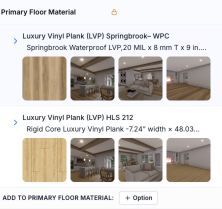
This structure lets a coordinator review which product was chosen alongside the basis for its amount. It also preserves a distinction between a product being considered and a product being selected. The reviewed screen indicated that a staff-selected group was locked against changes in the client portal until the selection was removed.
That lock has a practical consequence: if a homeowner changes direction, the team needs to revisit the recorded choice deliberately. The selected state should reflect the decision the team is actually working from.
For a similar process, put the product specification, quantity, and pricing basis together. Check whether delivery, tax, accessories, and installation are included before comparing two amounts. Our construction allowance template provides a spreadsheet version of that comparison.
Keep selection completion separate from price approval
The same project had allowance records marked complete without a recorded signature or approval timestamp on those allowance records. That observation does not tell us whether approval happened elsewhere. It does show why a selection status alone should not be presented as proof of a signed price change.
An allowance comparison answers one question: how does the recorded selected amount compare with the allowance? A documented approval answers another: what change did the customer authorize? Purchasing and payment are separate steps again.
For teams adapting this workflow, review those steps explicitly:
- Confirm the chosen product and scope.
- Compare the selected amount with the original allowance on the same basis.
- Record any required approval through the project's agreed process.
- Assign purchasing and track what has actually been ordered or paid.
Kaliun's allowance and selection tools support the selection record. The team's process still needs to establish when an overage can move forward.
Workflow 2: keep the project's stage visible
The reviewed remodel was marked “In Progress.” Its project view also exposed stages for planning, permitting, punch list, substantial completion, completion, warranty, and closure.
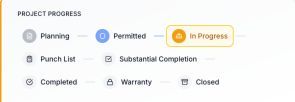
A project stage gives the team a shared reference for the overall job. It does not replace the more detailed selection statuses. A remodel can be in construction while an individual material decision still needs attention.
For another remodeling team, the useful handoff is to review the overall stage and the open decisions together. Before moving a job toward punch list or completion, review the unfinished work and unresolved choices rather than relying on the stage label by itself.
Workflow 3: attach dated job updates to the project
The same TGA project included a daily log with dated entries and attached photos and video. The reviewed entries covered work on multiple dates, including a mechanical-completion note, bathroom work, and a chimney update. The interface showed portal-visibility controls alongside those entries.
Those records provide a place to review what was documented on a given date. They also keep site updates separate from the material-selection record: a chosen product is a decision, while a dated job log records progress on the work.
This review did not establish whether a homeowner opened every update or whether the logs reduced phone calls. A practical routine to adopt is to record the work completed, what is next, and any decision that is blocking progress. Our construction client communication guide covers how to set expectations for those updates.
What this case study demonstrates
TGA is using Kaliun to maintain project-linked selection groups, distinguish selected products from alternatives, track the overall project stage, and keep dated site updates. These are observations from an operating workspace, rather than a hypothetical product walkthrough.
The benefit demonstrated here is the organization of those records around the job. Quantified claims about time saved, fewer mistakes, or higher margins would require separate measurement. We have not added those claims to this case study.
For remodelers evaluating a similar setup, bring one real workflow to a product conversation: an allowance with alternatives, a choice that needs approval, and a job update that needs to reach the right person. See the Kaliun workflow for remodelers to explore how the product fits those steps.
Sources and scope
Business context comes from TGA's public website. Product-use observations and the two screenshots come from a read-only review of TGA's live Kaliun project and allowance records on September 12, 2026. Screenshots are cropped captures of the actual interface; they are not generated mockups. Customer names, addresses, contact details, signatures, and portal access links are not published here.
This article replaces Kaliun's former “Best Kitchen Remodeling Companies in Tampa Bay for 2026” article with a disclosed account of the relationship between the two businesses. It makes no comparative ranking claim.